
Overview
Tile visibility is controlled by predefined permission rules configured at the tile level. When a tile does not appear for a logged-in agent, it is typically due to a mismatch between the agent’s profile data and the visibility rules assigned to that tile.
The system evaluates each user’s data against the tile’s “Accessible To” settings to determine whether the tile should be displayed.
How Tile Visibility Works
Each tile contains specific permission criteria such as:
- Member Status (e.g., Active, Inactive)
- Member Type (e.g., Agent, Broker, Appraiser, etc.)
When a user logs in, the system checks their MLS or profile data and compares it against these conditions. The tile will only display if all required criteria are met.
For example, if a tile is configured to show only to users with:
- Member Status = Active
- Member Type = Specific roles listed in the tile settings
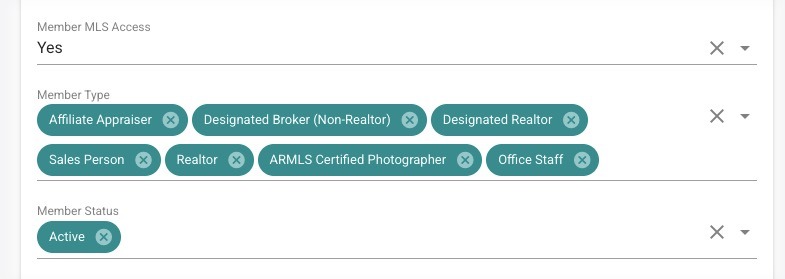
Then any user who does not meet both conditions will not see the tile.
Common Causes
A tile may not appear due to:
- The user having an inactive or non-matching Member Status
- The user’s Member Type not being included in the tile’s allowed list
- Incorrect or outdated MLS data tied to the user profile
- Tile configuration that is intentionally restrictive based on role or membership
Resolution
To resolve this issue, validate both the user data and the tile configuration.
Option 1: Verify User Data
- Check the agent’s record in the MLS or user management system
- Confirm their Member Status and Member Type are accurate and up to date
- Update the data if it is incorrect
Option 2: Adjust Tile Permissions
- Edit the tile configuration in the dashboard
- Review the Accessible To settings
- Modify Member Status or Member Type requirements as needed
Important Note
Tile visibility is not configured on a per-agent basis. The system does not allow individual overrides. Visibility is strictly determined by whether the user’s data matches the tile’s configured rules. If the criteria match, the tile will display; if not, it will remain hidden.